
Databases & Tenant Isolation
VSKI provides built-in multi-tenancy support, allowing you to manage multiple isolated databases within a single VSKI instance. This is perfect for SaaS applications, multi-environment setups, and client data isolation.
Note Schemas are append-only. You cannot rename columns through the interface. Dropping and renaming columns is a manual task.
Note Tables and columns are always soft-deleted when using the VSKI API. Data migration and breaking changes is an admin task that has to be done carefully and with a cool head.
Understanding Multi-Tenancy
Section titled “Understanding Multi-Tenancy”Each VSKI instance can host multiple databases, each stored as a separate file. This ensures complete data isolation between tenants while sharing the same application code and server infrastructure.
Database Directory Structure
Section titled “Database Directory Structure”data/├── default.db # Default database├── stats.db # Statistics database (reserved)├── workflows.db # Workflows database (reserved)├── client1.db # Client 1 database├── client2.db # Client 2 database└── client3.db # Client 3 databaseCreating Databases
Section titled “Creating Databases”Create a New Database
Section titled “Create a New Database”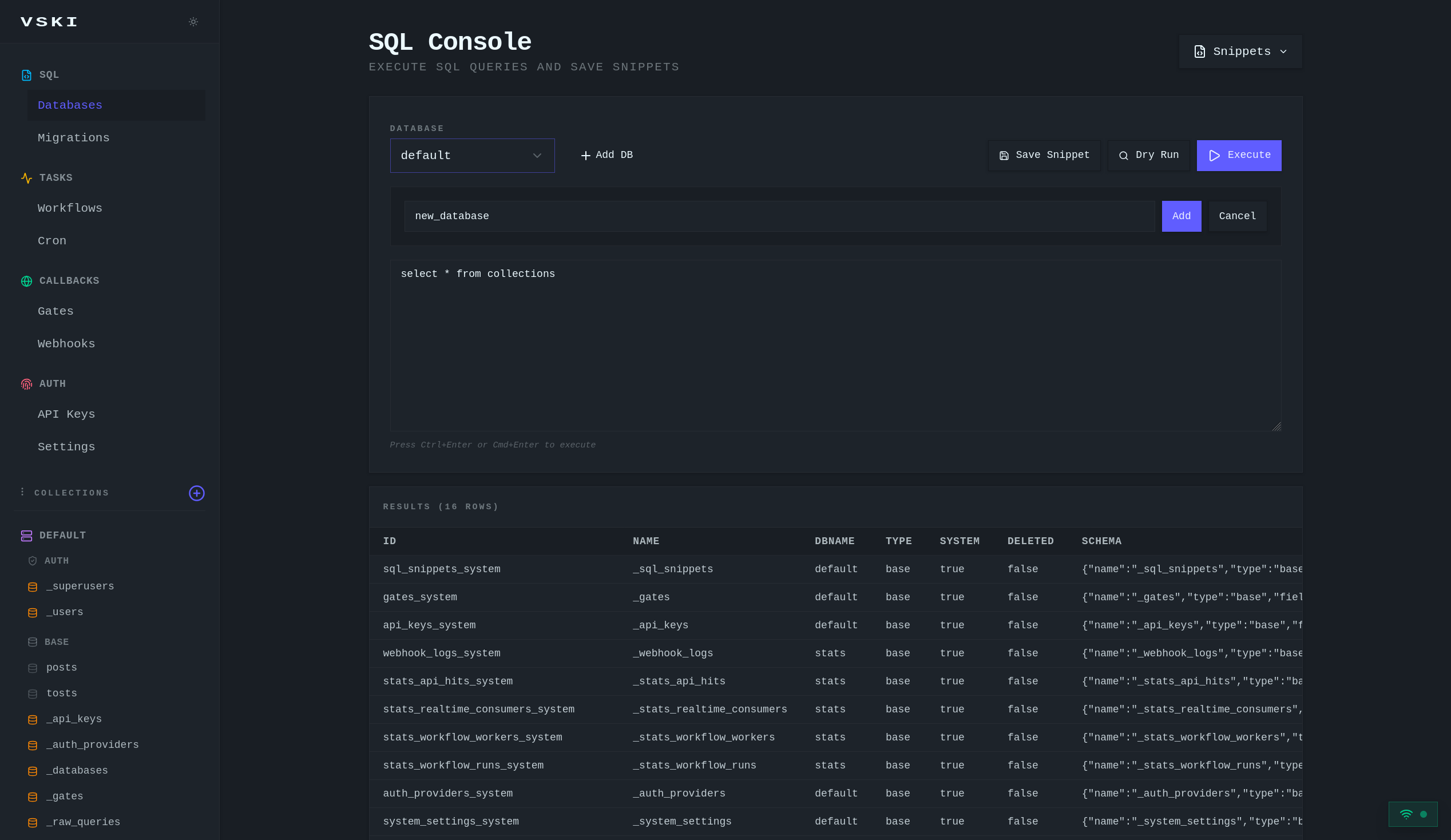
Databases are ensure-exists resources in the IaC YAML (see IaC);
they are never deleted by vski apply:
version: 1
databases: client1: description: Client 1 tenantvski db create client1 --description "Client 1 tenant" # imperative alternativedatabase = await client.settings.databases.create({"name": "client1"})print(database["name"]) # "client1"This creates a new client1.db file in the data directory.
List All Databases
Section titled “List All Databases”vski db listdatabases = await client.settings.databases.list()print(databases)# [# {"name": "default"},# {"name": "stats"},# {"name": "workflows"},# {"name": "client1"},# {"name": "client2"},# ]Accessing Specific Databases
Section titled “Accessing Specific Databases”The recommended approach is client.db(name):
# Access a specific databaseclient1_db = client.db("client1")
# All operations now use client1.dbposts = await client1_db.collection("posts").get_list(1, 20)
# Access another databaseclient2_db = client.db("client2")posts2 = await client2_db.collection("posts").get_list(1, 20)
client.set_db(name) also exists but switches the whole client.
Using HTTP Headers
Section titled “Using HTTP Headers”When making direct HTTP requests, use the x-dbname header:
import httpx
response = httpx.get(    "http://127.0.0.1:3000/api/collections/posts/records",    headers={        "Authorization": "Bearer your-token",        "x-dbname": "client1",    },)
Database Operations
Section titled “Database Operations”Database Isolation
Section titled “Database Isolation”Each database is completely isolated:
client1_db = client.db("client1")await client1_db.collection("posts").create({"title": "Post in Client 1"})
client2_db = client.db("client2")await client2_db.collection("posts").create({"title": "Post in Client 2"})
# switch back to client1posts = await client1_db.collection("posts").get_list(1, 20)print(len(posts["items"]))   # 1: only the post created in client1
Deleting Databases
Section titled “Deleting Databases”vski db rm client1ok = await client.settings.databases.delete("client1") # TrueWarning: Deleting a database permanently removes all its data.
Reserved Databases
Section titled “Reserved Databases”VSKI reserves three database names:
Default Database (default.db)
Section titled “Default Database (default.db)”The default database is used when no specific database is specified:
posts = await client.collection("posts").get_list(1, 20)Stats Database (stats.db)
Section titled “Stats Database (stats.db)”The stats database stores system statistics and logs:
stats_db = client.db("stats")stats = await stats_db.collection("_stats").get_list(1, 20)Do not store user data in the stats database.
Workflows Database (workflows.db)
Section titled “Workflows Database (workflows.db)”The workflows database stores all workflow-related data:
- Workflow runs and their status
- Workflow events and signals
- Job queues for distributed workers
- Hooks for external integrations
- Wait states for sleep/signal operations
workflows_db = client.db("workflows")runs = await workflows_db.collection("workflow_runs").get_list(1, 20)Do not store user data in the workflows database. This database is
automatically omitted from replication.
SaaS Application Pattern
Section titled “SaaS Application Pattern”Tenant Registration
Section titled “Tenant Registration”async def register_tenant(client, tenant_data): # Create tenant record in the default database tenant = await client.db("default").collection("tenants").create( {"name": tenant_data["name"], "subdomain": tenant_data["subdomain"], "status": "active"} )
# Create isolated database for the tenant await client.settings.databases.create({"name": tenant["id"]})
# Initialize the tenant's collections (see below) await initialize_tenant_database(client, tenant["id"])
return tenantTenant Database Initialization
Section titled “Tenant Database Initialization”Collections are declared once and apply across databases (schema is global;
records are stored separately in each database file). With IaC, a tenant
database reuses the same collection files with a different database: line:
# vski/tenants/client1/collections.yaml: same schema, scoped to the tenant dbversion: 1database: client1
collections:  users:    type: auth    fields:      - {name: email, type: email, required: true}      - {name: password, type: text, required: true}      - {name: name, type: text}
posts: type: base fields: - {name: title, type: text, required: true} - {name: content, type: text}vski apply # creates the database entries and collectionsTenant Access
Section titled “Tenant Access”async def login_tenant_user(client, tenant_id, email, password): tenant_db = client.db(tenant_id) result = await tenant_db.auth.login(email, password) return resultMulti-Environment Setup
Section titled “Multi-Environment Setup”Development, Staging, Production
Section titled “Development, Staging, Production”import os
env = os.environ.get("NODE_ENV", "development")databases = { "development": "dev", "staging": "staging", "production": "prod",}env_db = client.db(databases[env])Environment Isolation
Section titled “Environment Isolation”version: 1
databases: dev: {description: Development} staging: {description: Staging} prod: {description: Production}dev_db = client.db("dev")# All operations here are isolated from staging and prodDatabase Configuration
Section titled “Database Configuration”Custom Data Directory
Section titled “Custom Data Directory”Set a custom directory for database files:
export DATA_DIR="/path/to/custom/data"Database File Location
Section titled “Database File Location”# Default location: ./data/# Custom location via DATA_DIR environment variable## Database files are:# - default.db# - client1.db# - etc.Cross-Database Operations
Section titled “Cross-Database Operations”Scope per database with client.db(name) (records are isolated per
database; schemas are shared):
shared = await client.db("shared").collection("shared_data").get_list(1, 20)Monitoring
Section titled “Monitoring”Database Statistics
Section titled “Database Statistics”client1_db = client.db("client1")stats = await client1_db.collection("_stats").get_list(1, 20)print(stats["items"])Storage Usage
Section titled “Storage Usage”Check database file sizes on the server host:
from pathlib import Path
data_dir = Path("./data")for file in sorted(data_dir.glob("*.db")):    print(f"{file.name}: {file.stat().st_size / 1024 / 1024:.2f} MB")
Backup and Restore
Section titled “Backup and Restore”cp data/client1.db backups/client1.db # backupcp backups/client1.db data/client1.db # restore (stop the server first)See Backup for the snapshot-based rotation script.
API Endpoints
Section titled “API Endpoints”| Method | Endpoint | Description |
|---|---|---|
GET | /api/databases | List all databases |
POST | /api/databases | Create new database |
DELETE | /api/databases/:name | Delete database |
Best Practices
Section titled “Best Practices”- Use descriptive names: make database names clear and meaningful
- Isolate tenants completely: each tenant gets their own database
- Document database structure: keep track of which databases exist and
their purpose (the IaC
databases.yamlis that list) - Implement proper backup: regular backup of all databases
- Monitor storage: track database file sizes
- Use reserved names carefully: only use
default,stats, andworkflowsfor their intended purposes - Set proper permissions: ensure users can only access their own databases
- Test multi-tenancy: verify data isolation in your application